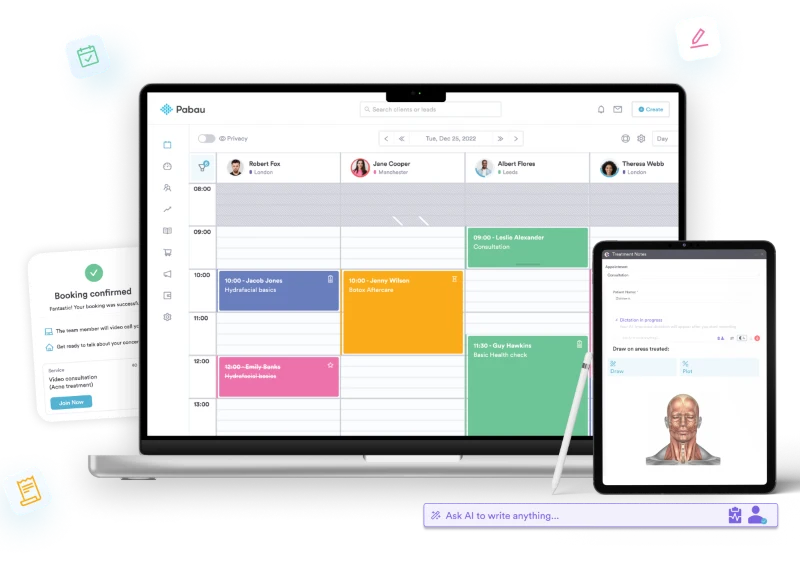
Pabau presents itself as an all-in-one practice-management platform for clinics that want to bring scheduling, records, payments, communications and reporting into one system. Its public materials make it a credible option for a UK private clinic’s initial software shortlist, particularly where the buying team wants a broad operational platform rather than a collection of separate tools.
The important caveat is that a public feature list is not a substitute for a fit assessment. Before committing, a clinic should map its own workflows, user count, locations and optional requirements to Pabau’s current proposal, then confirm the UK price and implementation scope with the supplier.
Pabau at a glance
AI-generated illustration — not a retailer product photo.

Pabau’s public positioning is straightforward: one platform intended to support practices of different sizes. The product pages describe tools for running and growing a practice, spanning appointment and staff scheduling, client records, reminders, reporting, payment processing, patient experience and multi-location administration. The pricing page says every plan provides full access to the Pabau platform, with the subscription structured around the number of users required.
That combination makes Pabau worth considering when a private clinic is trying to reduce the operational friction of moving between calendars, paper or fragmented records, payment tools and reporting systems. It may be especially relevant where a team wants common staff permissions and shared operational data rather than point solutions owned by separate departments.
It should not be treated as an automatic recommendation for every clinic. A small practice may value simplicity and price certainty above breadth, while a larger group may need detailed proof that location-level governance, integrations, migration and reporting meet its internal requirements. The sensible shortlist question is therefore not simply whether Pabau has a feature, but whether its configuration, costs and rollout approach suit the clinic’s operating model.
For a broader procurement framework, compare this type of platform against the criteria in a practice-management-software buying guide and a clinic-software comparison.
Core features for clinic operations
AI-generated illustration — not a retailer product photo.

Pabau’s published feature overview covers the main workflows many private clinics evaluate first. Its Calendar is described as a place to keep appointments and staff schedules together, while online booking is included in the platform list. The records capability is presented as a digital client-information view, and the platform also lists forms, documents and photos alongside Patient Portal and digital records.
For attendance and communication workflows, Pabau says it supports SMS and email appointment reminders. Its public page connects these reminders with reducing missed bookings, but a procurement team should validate the actual reminder rules, message templates, consent controls, delivery options and any message-related charges during a demo.
The commercial operations range is also broad on paper. Pabau lists payments, point of sale (POS), invoicing, packages and memberships, plus a payment-policy tool for automating payment requests. Inventory management, marketing tools and automation, lead management, reporting and insights, and team roles and permissions are also named as platform capabilities. This may be attractive for a clinic that wants billing and front-desk activity to sit closer to clinical-administration records; it is still worth checking which capabilities are standard configuration, which need setup work and which depend on an add-on.
For growing organisations, the feature page specifically includes multi-location management, saying locations, appointments, staff and services can be managed from one place. It also lists integrations, video conferencing, a mobile app, waitlist functionality, dictation and Pabau Scribe. These are useful signals of range, not proof of suitability for a particular specialty or existing technology stack. Ask the supplier to demonstrate the exact workflow—such as a rescheduled appointment, a payment record, a multi-site report or a patient communication—from start to finish using a realistic clinic scenario.
Useful related reading includes online-booking software and patient-records software.
Pricing model and plan structure
AI-generated generic editorial illustration — not a retailer product photo and does not depict the reviewed product or service. Illustration supporting this section.
 Pabau’s pricing page says it is priced by team size and that every plan includes full platform access. It also states that pricing depends on location and the number of users needed. This means the published plan structure is a helpful starting point for budgeting, but a UK buyer should seek a current UK quote rather than assume a figure shown in another market or a previous period will apply.
The page lists Starter for one user and up to 100 clients at £50 per month, while Solo is listed for one user with unlimited patients. It then groups Team around two to three users, Medium around four to five users, Group around six to 15 users, and Enterprise around 16 or more users; Enterprise is described as supporting multiple locations. The page also says annual billing can save up to 20%, subject to the supplier’s current terms.
The practical implication is that Pabau’s public packaging invites a scale-based conversation. A new or very small practice can assess whether Starter’s client limit and stated use case fit its expected activity. A single clinician with higher patient volume may want to compare that position with Solo. Shared calendars, rooms and staff access are explicitly associated with Team, while the higher bands are framed around more practitioners, automation, performance tracking, central inventory, reporting and cross-site governance.
However, do not reduce the purchasing decision to the headline subscription. Pabau also says the core subscription can be extended with optional add-ons, available with any plan. Request an itemised proposal that distinguishes recurring licence costs, optional modules, implementation services, migration, training, messaging or payment-related costs, integrations and renewal terms. That will make it easier to compare a Pabau quote with the total cost of alternative clinic-management systems.
For comparison methods, see a clinic-software pricing guide and a guide to practice-management-software costs.
What to verify before signing
Start by confirming the commercial scope. Pabau’s own pricing page says price varies by location and user count, and it describes optional add-ons. Ask for the UK price, billing cadence, included users, any client or usage limits, the price of every requested add-on, and what happens when the practice grows into the next user band. Clarify whether quoted savings for annual payment are available for the specific proposal.
Next, turn the feature list into a demonstration script. Pabau publicly lists scheduling, booking, digital records, forms, payments, POS, invoicing, reporting, inventory, permissions and multi-location management. Have the supplier show the exact clinic journey your team cares about: booking and reminders; record creation and documents; payment and invoice handling; staff access; reporting; and, if relevant, a cross-site workflow. Include exceptions such as cancellations, a clinician absence, a refund, a new location or a permission change.
Finally, examine implementation rather than assuming that breadth equals an easy rollout. Public materials describe an integrated platform, but they do not establish the effort required to migrate a clinic’s existing data, configure templates, connect other systems or train staff. Obtain a written implementation plan with responsibilities, milestones, data-migration assumptions, training, support, acceptance criteria and a contingency route if go-live takes longer than expected.
A software-demo checklist and healthcare-software implementation guide can help structure these questions.
Who Pabau may suit
Pabau may be a sensible first evaluation for a UK private practice that wants a single platform across front-desk and operational workflows. Its public materials group scheduling, online booking, records, forms, payments, POS, invoicing, marketing automation, reporting, inventory and permissions under the same platform. That is a relevant starting point for a clinic seeking to consolidate systems or standardise workflows among several practitioners.
The published team-size structure also makes it potentially relevant across several operating stages. A one-user practice can assess the Starter or Solo positioning; teams sharing calendars, rooms and staff access can examine the Team plan; and organisations with four or more users can explore the higher team bands. A larger clinic group with multiple sites may find Pabau worth evaluating because Enterprise is publicly described as multi-location supported and the features page includes multi-location management.
The strongest fit is likely to emerge when the clinic can articulate why consolidation matters: fewer disconnected processes, a shared view of operational activity, more consistent permissions, or central reporting across a growing team. A weaker fit may arise where the clinic only needs a very narrow function, has unusual specialty workflows that require substantial customisation, or cannot validate a compatible migration and integration plan.
Use a choosing-clinic-management-software guide and multi-location-clinic-software resources to compare those scenarios consistently.
Frequently Asked Questions
How does Pabau price its practice management software?
Pabau says its platform is priced by team size, with pricing dependent on location and the number of users required. Its public page lists Starter for one user and up to 100 clients at £50 per month, then Solo, Team, Medium, Group and Enterprise bands. It also states that all plans include full access to the platform and that optional add-ons can extend the core subscription. Request a current UK proposal for the complete cost.
What features are included in Pabau’s platform?
Pabau publicly lists scheduling and online booking, a Patient Portal and digital records, forms and documents, integrations, payments, POS and invoicing, packages and memberships, marketing tools and automation, inventory, reporting, roles and permissions, lead management, and care and clinical workflows. Its feature overview also names calendar and scheduling, client records, reminders, a mobile app, multi-location management, video consultations, dictation and a waitlist. Confirm the setup and commercial scope of the features that matter to your clinic.
Is Pabau designed for multi-location clinics?
Pabau’s feature page includes multi-location management for handling locations, appointments, staff and services from one place. Its pricing page describes Enterprise, for 16 or more users, as multi-location supported. A clinic group should still ask for a demo of its own cross-site permissions, reporting, booking and governance requirements before deciding that the capability is a fit.
What should a UK clinic confirm during a Pabau demo?
Confirm the UK price for the required user count, all optional add-ons and billing terms. Then ask the supplier to demonstrate your real booking, records, reminders, payment, reporting and staff-access flows, including exceptions. If you operate more than one site or use existing specialist systems, include cross-location reporting, permissions, migration, integrations, training and the written implementation plan in the evaluation.
View Pabau’s pricing information and feature overview.
Related reading
- Best practice management software for UK private clinics: evidence-led top choices
- Cliniko review for UK private practices: strengths, limits, and alternatives
- WriteUpp review for UK therapists and clinics: features, costs, and fit
- How to budget for practice management software: total cost of ownership for UK clinics
Editorial information: About our editorial team · Read our editorial policy · Read our affiliate disclosure.